How to Use an OBD2 Scanner: A Beginner’s Guide
By DealShore Motors
Every driver knows the feeling. You’re cruising along, minding your own business, and then — bloop — an amber engine icon lights up on the dash. The check engine light. No noise, no smoke, no obvious change. Just that little glowing engine, sitting there like a cryptic message from the car’s brain.
Here’s the secret: it is a message from the car’s brain. And for about the price of a pizza, you can buy the translator.
What OBD2 Actually Is (and Why Every Car Has the Port)
OBD stands for On-Board Diagnostics. In 1996, the U.S. government made OBD-II mandatory for every new car and light truck sold in America — mainly to enforce emissions rules. Europe followed with its own version (EOBD) around 2001 for gasoline cars and 2004 for diesels. The result: virtually every passenger car built in the last 30 years speaks the same basic diagnostic language.
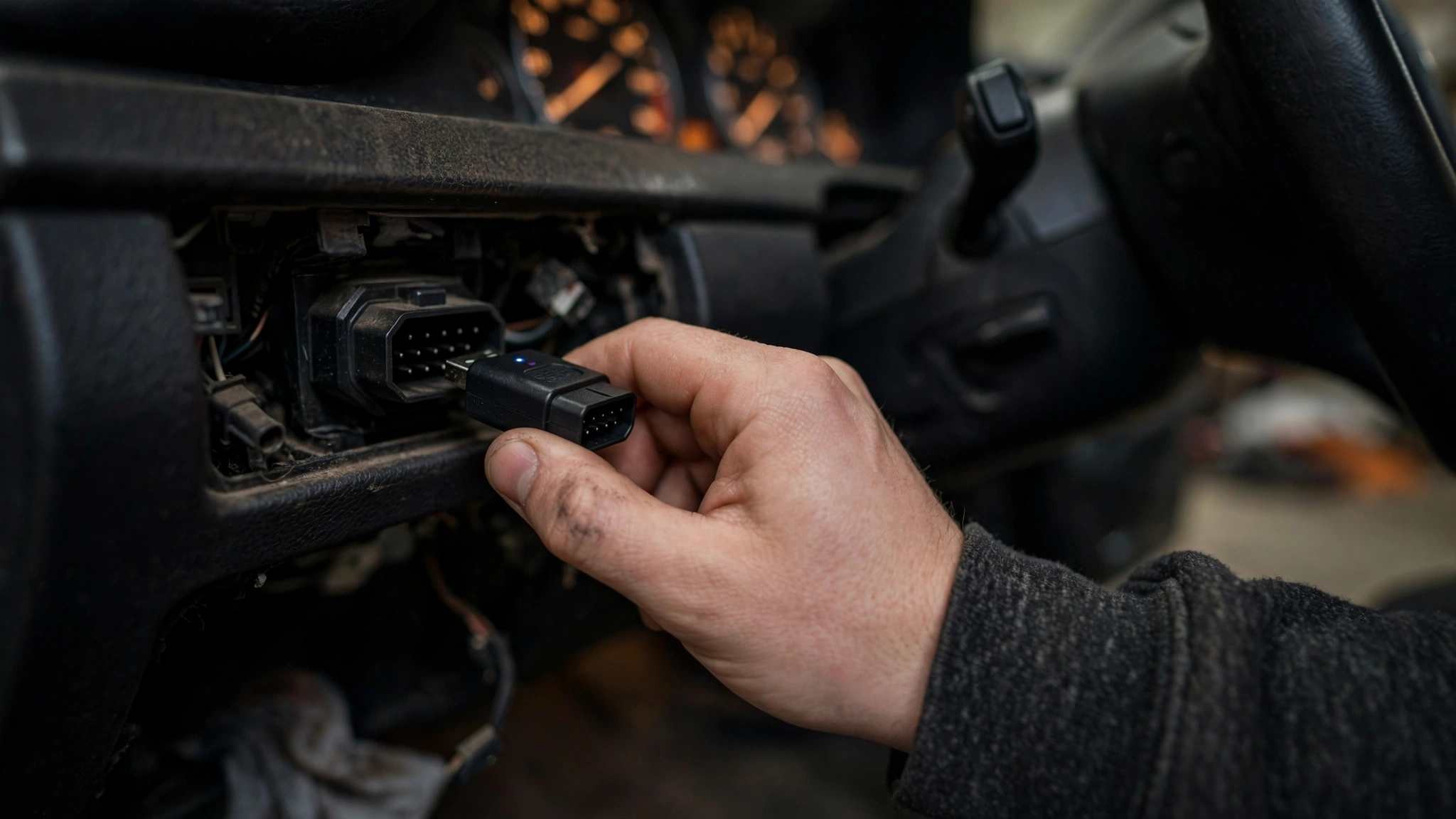
The port itself is a 16-pin connector (the DLC) that sits near the steering column — almost always under the dashboard, driver side. Pop your head under the dash with a flashlight: it’s a trapezoid-shaped plug, roughly an inch wide.
The Three Kinds of Scanners
Not all scanners are the same animal. Here’s the honest breakdown, from cheapest to most capable.
1. Basic handheld code readers ($20–$60)
The simplest tool in the box. Plug it in, it powers itself from the port, shows you the codes on a small screen, lets you clear them. Some, like the Foxwell NT301 or ANCEL AD310, add niceties — live data graphs, freeze-frame data, an I/M readiness check button.
Best for: glovebox insurance. Your light comes on, you want to know whether it’s an emergency or a loose gas cap before you drive 40 minutes to a shop.
2. Bluetooth/Wi-Fi dongles + phone apps ($30–$140)
A tiny plug that lives in the port and talks to your smartphone. The app is where the magic happens: plain-English code definitions, repair suggestions, live data graphs, data logging.
Names you’ll run into: BlueDriver (around $120–$130, excellent repair reports built from real mechanic fixes), FIXD (around $60–$70, beginner-friendly plain English, though some features need a subscription), Veepeak OBDCheck BLE (budget-friendly, works with third-party apps like Torque), and OBDLink MX+ (around $140, the data nerd’s choice — fast, works with multiple apps including FORScan for Fords).
Best for: beginners who want explanations, not just codes. If you’d rather read “Cylinder 3 misfire — common causes: spark plug, coil, fuel injector” than a bare P0303, this category is your friend.
3. Professional scan tools ($200–$1,000+)
Handheld tablets like the Autel MaxiCOM MK808 or Launch CRP129E that read far beyond the engine: ABS (brakes), SRS (airbags), transmission, body modules. The pro-tier tools add bi-directional controls — they can command parts to activate (cycle the ABS pump, run a fan test), reset service intervals, and do manufacturer-specific coding.
Best for: serious DIYers and people working on multiple cars. Overkill for a beginner — but good to know what “full-system scan” means when a shop mentions it.
Our recommendation for a beginner: a Bluetooth dongle like the BlueDriver or FIXD, or a basic handheld like the Foxwell NT301. Either way you’re under $130, and you’ll use it for years.
How to Actually Use One: Step by Step
Five minutes your first time, two minutes every time after.
Step 1: Find the port. Ignition off. Look under the driver’s-side dash, near the steering column. It’s a 16-pin trapezoid connector. Some cars have a little dust cover over it.
Step 2: Plug in the scanner. It only fits one way — don’t force it. Handhelds draw power straight from the port and will light up on their own. Bluetooth dongles usually have a small LED that comes on.
Step 3: Turn the key to ON — engine off. This is the position where the dash lights come up but the starter hasn’t cranked. The car’s computer needs power, but for code-reading the engine should not be running. (Live-data monitoring while driving is a separate thing.)
Step 4: Read the codes. On a handheld, scroll to “Read Codes” or “DTC.” On a phone app, tap the scan or read button. The scanner talks to the car’s computer for a few seconds, then shows you what it found.
Step 5: Write them down. Photograph the screen or screenshot the app. If there are multiple codes, record all of them — and the order they appear in.
Step 6: Look up what they mean. The phone-app scanners do this automatically. With a bare-bones handheld, search the exact code plus your car’s make, like “P0420 Honda Accord 2016.”
Step 7: Don’t clear anything yet. The most important step, and beginners get it wrong constantly. More on this below.
Decoding What You See: The Anatomy of a Code
Every OBD2 trouble code is five characters: one letter followed by four numbers. Each character narrows down the problem. Take the most famous code in the world — P0300:
- P = Powertrain (engine, transmission, emissions). The other letters are B (Body — airbags, power windows), C (Chassis — ABS, steering, suspension), and U (Network — the car’s internal communication between modules).
- 0 = Generic code, the same on every car brand. A 1 here means manufacturer-specific — a code Toyota or BMW defined for themselves.
- 3 = the subsystem. For powertrain: 1–2 = fuel and air, 3 = ignition and misfires, 4 = emissions controls, 5 = idle/speed, 6 = computer outputs, 7–8 = transmission.
- 00 = the specific fault. Random/multiple cylinder misfire.
So P0300 reads as: powertrain → generic → ignition/misfire → random multiple cylinder misfire. A mechanic would start with spark plugs and coils.
A few more you’ll meet sooner or later:
- P0171 — System Too Lean (Bank 1). Usual suspects: vacuum leak, dirty mass airflow sensor, weak fuel pump. This is the “my car idles rough and drinks gas” code.
- P0420 — Catalyst System Efficiency Below Threshold (Bank 1). Sometimes it really is a dying catalytic converter ($800–$2,500 repair). Sometimes it’s a $30 lazy oxygen sensor lying to the computer. Diagnosis matters — guessing wrong here is expensive.
- P0303 — Cylinder 3 Misfire Detected. Same family as P0300 but pinpointed to one cylinder, which actually makes it easier to diagnose: swap the coil from cylinder 3 to cylinder 1, rescan, and see if the misfire follows the coil. That’s a real diagnostic trick techs use.
One more distinction your scanner may show: active (stored) codes versus pending codes. A pending code means the fault happened once but hasn’t repeated enough times for the computer to commit — many codes need the failure on two consecutive drive cycles before the check engine light comes on. A pending code is your early warning.
Freeze Frame: The Crime-Scene Photo
When the computer stores a code, most cars also capture a freeze frame — a snapshot of sensor readings at the exact moment the fault occurred: RPM, vehicle speed, coolant temperature, throttle position, fuel trim, hot or cold.
This is wildly useful. P0171 with a freeze frame showing the fault at idle points to a vacuum leak; the same code at highway speed points to a fuel delivery problem. Same code, different suspects. If your scanner supports freeze frame (most mid-tier ones do), always check it before you start throwing parts at a problem.
Readiness Monitors: The Emissions Test’s Lie Detector
Your car’s computer runs a series of self-tests called readiness monitors — on the catalytic converter, the EVAP system, the oxygen sensors, the EGR valve, and more. Each monitor flips to “Ready” (complete) or “Not Ready” (incomplete) as the tests finish during normal driving.
This matters for two reasons:
- Emissions inspections. Most states won’t pass a car with too many monitors “Not Ready.” Federal guidance allows one incomplete monitor on 2001+ vehicles (two on 1996–2000), but states vary.
- Buying a used car. This is the big one — we’ll come back to it below.
The catch: clearing codes resets every monitor to “Not Ready.” The car then needs a proper drive cycle — typically 50–100 miles of varied driving over several days — before the monitors complete again.
Live Data: Watching the Car Think
Most scanners above the bare-budget tier can stream live data — real-time sensor readings. You don’t need to understand all 200+ parameters. Three are worth knowing:
- Fuel trim (STFT/LTFT) — how much the computer is compensating the fuel mixture. Near 0% is healthy. Long-term trim stuck above +10% means the engine is chronically running lean (think vacuum leak or weak fuel pump).
- Coolant temperature — should settle around 190–220°F (88–105°C) when warmed up. A car that never gets there has a stuck-open thermostat — bad for fuel economy and emissions.
- O2 sensor voltage — should oscillate rapidly on a healthy sensor. A lazy, flat line means a dying sensor.
Graphing these over time (most apps do this with one tap) turns numbers into a story. A fuel trim graph that climbs at idle but flattens at cruise speed is practically shouting “vacuum leak.”
After the Code: What to Do Next (Don’t Just Clear It)
Getting the code is step one. Step two is where money gets saved or wasted.
1. Research the code for your specific car. “P0420” on a 2015 Subaru and a 2015 Honda can have different most-likely causes. Search the code plus your year, make, and model. Owner forums and Reddit’s r/MechanicAdvice are goldmines for pattern failures — problems so common on a model that techs diagnose them in their sleep.
2. Check for Technical Service Bulletins (TSBs). These are the manufacturer’s “yeah, we know about this” notices sent to dealers. Some scanners (BlueDriver, Topdon TopScan) pull TSBs right in the app. A TSB matching your code can turn a mystery into a known fix.
3. Start with the cheap and simple. A huge percentage of check engine lights trace back to: a loose or cracked gas cap (EVAP codes like P0442/P0455 — tighten it, drive a few days, the light may clear itself), a dirty mass airflow sensor (cleanable with a $10 spray), or a 12-volt battery on its last legs (low voltage makes modules throw ghost codes across multiple systems). Check the easy stuff first. Always.
4. Clear the code only after the repair. Fix the problem, clear the code, drive normally for a few days, then rescan. Code stays gone? You nailed it. Code comes back? The diagnosis was wrong — and now you know that too.
5. Know when to fold. Transmission codes (P0700 family), airbag codes, or a code that returns immediately after clearing — that’s a shop visit. A scanner tells you where to look; it doesn’t replace the looking.
And one hard rule: a flashing check engine light means a severe misfire happening right now — raw fuel dumping into the catalytic converter, which can destroy it in minutes. A steady light means “schedule a diagnosis soon.” A flashing light means “ease off the gas and get to a shop today.” That’s the one dashboard distinction every driver should memorize.
Using a Scanner When Buying a Used Car
This is the scanner’s secret superpower, and it’s worth the price of the tool all by itself.
Bring the scanner to the test drive — and check the readiness monitors, not just the codes. Clearing codes resets all monitors to “Not Ready,” and they need 50–100 miles of driving to complete.
So if you’re looking at a car whose check engine light is off and whose monitors are all “Not Ready”… someone cleared the codes very recently. Maybe the seller just replaced the battery (which also resets monitors — ask for the receipt). Or maybe they erased the evidence of a P0420 and are hoping you buy before the light comes back on.
Red flags: codes present that the seller “didn’t know about”; monitors “Not Ready” with no plausible explanation; permanent codes (newer cars store certain emissions codes so they can’t be cleared with a scanner — only the car removes them after the fault is truly fixed); pending codes the seller waves off as “nothing.”
None of this replaces a pre-purchase inspection by a mechanic. But a $30 scanner has saved plenty of buyers from $3,000 mistakes.
What Scanners Can’t Tell You
Let’s be honest about the limits, because inflated expectations lead to bad decisions:
- A code identifies the circuit or system, not the exact part. P0303 says cylinder 3 is misfiring. It doesn’t say whether it’s the spark plug, the coil, the injector, or low compression. The scanner points; you (or a tech) still diagnose.
- Basic readers usually only read engine (P) codes. If your ABS or airbag light is on, a $25 reader will shrug. You need a scanner with ABS/SRS coverage.
- Mechanical problems are invisible. Worn brakes, a torn CV boot, a rusted frame — no sensor, no code. The scanner is blind to anything the computer isn’t watching.
- Cheap no-name dongles can be flaky. The $12 ELM327 clones flooding online marketplaces sometimes drop connections, misreport data, or — rarely — keep modules awake and drain the battery if left plugged in. Stick with known brands, and unplug the dongle when you’re done.
Beginner Mistakes to Avoid
- Clearing codes before diagnosing. You just deleted the freeze frame and reset the monitors. Now the light will come back in three days and you’ve learned nothing. Diagnose first, clear last.
- Replacing the part the code names. P0420 says “catalyst efficiency,” so people buy catalytic converters. Half the time it was an oxygen sensor. The code is a symptom description, not a parts order.
- Ignoring pending codes. That pending misfire is next month’s flashing check engine light. Catch it now.
- Forgetting to unplug a Bluetooth dongle. Some cheap ones draw power constantly. Dead battery the next morning is a rude lesson.
- Assuming “no codes” means “no problem.” Mechanical wear doesn’t set codes. The scanner is one tool, not the whole toolbox.
The Bottom Line
A check engine light used to mean a trip to the shop and a diagnostic fee before anyone even knew what was wrong. Now it means a five-minute conversation with your own car. The scanner doesn’t make you a mechanic — but it makes you an informed customer, and that’s worth more than most people realize.
Thirty dollars. Five minutes. One trapezoid plug under the dash. There’s no cheaper upgrade to your car-ownership game.
Dealing with a stubborn code or shopping for a used car and want a second opinion? DealShore Motors is building the driver’s guide to buying smart — more deep dives like this every week.
Sources: SAE J2012 DTC structure (P/B/C/U system groups; generic vs. manufacturer-specific digit); EPA OBD-II mandate for 1996+ model year vehicles and 16-pin DLC placement requirements; product specifications and pricing from manufacturer listings and 2026 review roundups (BlueDriver ~$120–130, FIXD ~$59–70, Foxwell NT301 ~$80–120, Autel MK808 ~$400–500, Innova 5610 ~$150–200, OBDLink MX+ ~$140, ANCEL AD310 ~$25–35, Autel AL319 ~$40–60, Launch CRP129E ~$150–200); emissions readiness monitor drive-cycle guidance; MotorTrend’s OBD-II fault code decoder reference.
Leave a Reply